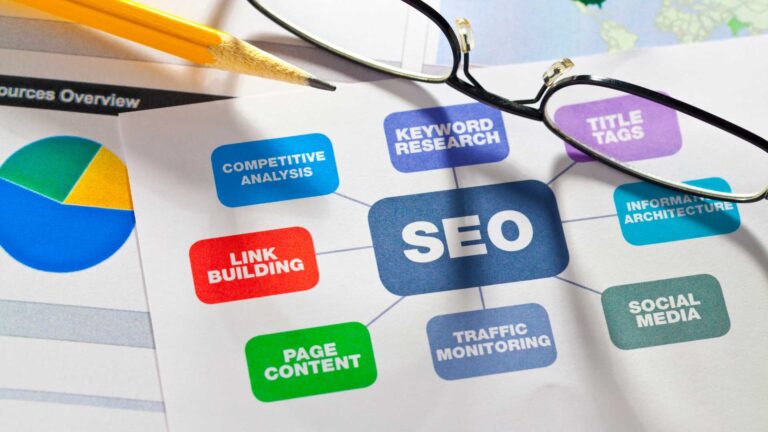
Nobody likes a slow website, and search engines feel the same way. Page speed is more than just a technical detail—it plays a big role in user experience and directly influences your rankings. Faster sites don’t just rank higher; they keep users engaged longer, reduce bounce rates, and improve conversions. If boosting your SEO strategies is a priority, addressing page speed should be at the top of your list. Let’s explore why it matters so much and how to fix it.
Understanding Page Speed
Page speed isn’t just a metric for developers; it’s a core aspect of effective SEO strategies. A slow-loading page frustrates users and sends negative signals to search engines, impacting your rankings. When visitors click on your link, their first impression often hinges on how fast your page loads. But page speed is more than a single measurement—it’s a combination of factors that require thoughtful optimization.
What is Page Speed?
Page speed refers to how quickly your web page’s content appears and becomes usable. However, it’s essential to differentiate between two key aspects:
- Loading Speed: This is the time it takes for the entire content of a webpage to load. Think of it as filling a canvas; every image, text block, and script has to settle into place.
- Page Rendering Speed: Unlike loading speed, rendering speed focuses on how quickly users can see and interact with the most important elements—even if the page hasn’t fully loaded yet.
Imagine you’re waiting for an elevator. You don’t need all the floors to appear at once; you just care about the one that gets you where you’re going. Similarly, rendering speed ensures users can start interacting with key parts of your site before everything is done loading.
Components That Affect Page Speed
Several factors can either slow down or boost your page speed. Here’s what to keep an eye on:
- High-Resolution Images: Large image files often eat up bandwidth and bloat loading times. Compressing files and using next-gen formats like WebP can make a big difference.
- Scripts and Plugins: Heavy JavaScript or unnecessary third-party plugins can slow your site. Always audit which scripts are essential and remove the ones that aren’t adding value.
- Server Performance: Your hosting provider plays a pivotal role. A slow server response time can bottleneck the speed at which your page starts loading. Consider opting for optimized hosting services or using content delivery networks (CDNs).
- Rendering Blocking Resources: Elements like CSS or JavaScript files that delay rendering can harm user experience. Minify and defer them to improve performance.
- Caching: Without proper caching, your website delivers fresh files every time—wasting resources. By leveraging browser caching, you can reduce repeat load times significantly.
Every one of these pieces works like gears in a clock. When one is out of sync, the entire mechanism slows down, negatively affecting how your site performs in search results.

Photo by FBO Media
Optimizing page speed is like fine-tuning a high-performance car. Each adjustment ensures that it runs smoothly and efficiently, delivering a sleek experience both for the driver and anyone watching it fly by. In SEO terms, your “audience” includes Google, which rewards sites tuned for performance.
By understanding what contributes to page speed, you’ll have the tools to create a site that satisfies users and search engines. This becomes a critical part of your overall SEO strategies.
Page Speed as a Ranking Factor
Page speed isn’t just a technical metric for developers—it’s a determining factor for search engines and how they rank sites. Whether you’re an SEO freelancer or a marketing agency, understanding how page speed fits into rankings is key to staying competitive. Let’s break it down further.
Direct vs Indirect Ranking Factors
Google considers page speed a direct ranking factor. This means the speed at which a page loads can impact your position on search engine results pages (SERPs). However, it’s not always a standalone game-changer. Think of it as part of a bigger picture. While a slow website can hurt your rankings, a fast one won’t automatically catapult you to the top unless paired with quality content and strong SEO strategies.
By contrast, page speed plays a supporting role in indirect ranking factors like user engagement. When your site loads quickly, users are more likely to stay, click through your pages, and share your content. On the flip side, slow load times lead to frustration, higher bounce rates, and fewer interactions—all of which send bad signals to Google.
In essence, page speed not only plays the “main act” but also sets the stage for other ranking factors to thrive.
Impact on User Experience
Imagine entering a store but waiting minutes to open the door. Frustrating, right? For users, slow-loading pages feel the same. Studies have shown that when page load time increases from 1 to 3 seconds, bounce rates increase by 32%. Now, think of businesses trying to make a first impression—those seconds are everything.
High bounce rates caused by delays signal to search engines that visitors aren’t finding value in your site. Even if your content is stellar, users won’t stick around long enough to see it if the page takes forever to load. Beyond rankings, slow speeds can hurt your brand’s reputation and lead to lost conversions.
But here’s the good news: improving page speed isn’t about compromising visuals or content. Optimizing images, using a CDN, and enabling caching ensures your site runs as fast as users expect.
Photo by Pixabay
In today’s fast-paced world, speed is trust, and trust translates into better engagement and higher rankings. By addressing page speed, you’re not just meeting Google’s expectations—you’re providing a better experience for users, too.
Measuring Page Speed
Page speed is a core aspect of successful SEO strategies, and measuring it accurately is the first step in making improvements. Several tools, including Google PageSpeed Insights, make analyzing your website’s performance straightforward and actionable. Properly evaluating your page speed ensures your site delivers a great experience to users—and keeps search engines happy.
Using Google PageSpeed Insights
Google PageSpeed Insights is one of the most trusted tools for analyzing site speed and overall performance. It provides a detailed breakdown of both mobile and desktop website speeds, along with actionable suggestions for improvement.

Photo by Vlada Karpovich
Here’s a simple guide to using PageSpeed Insights effectively:
- Access the Tool: Go to the PageSpeed Insights website.
- Input Your URL: Enter the page URL you want to analyze and click “Analyze.”
- Review the Scores: The tool gives you two scores—one for mobile devices and another for desktops.
- Check Core Web Vitals: These metrics focus on loading speed, interactivity, and visual stability. Pay close attention to “Largest Contentful Paint,” “First Input Delay,” and “Cumulative Layout Shift.”
- Explore Suggestions: The tool provides recommendations like reducing image sizes, enabling compression, and minifying CSS/JavaScript files.
- Implement Changes: Work on the suggested optimizations to improve your scores and website performance.
Use this tool frequently to monitor your progress and address new speed challenges as your website grows.
Other Useful Tools
While Google PageSpeed Insights is a great starting point, there are other tools worth exploring. Each has unique features to evaluate your page speed effectively and provide insights for improvement.
Here’s a quick list of popular alternatives:
- GTmetrix: Offers detailed breakdowns of load times, page sizes, and performance scores. It’s excellent for visualizing your site’s speed metrics with waterfall charts.
- Pingdom: Known for its user-friendly interface, Pingdom monitors uptime and provides site performance grades based on speed.
- WebPageTest: A highly detailed tool for advanced users, it allows multi-step transactions and compares performance across multiple browsers and devices.
- Chrome DevTools: Built into Google Chrome, this developer tool lets you audit website performance in real-time.
- Lighthouse (via Chrome DevTools): Part of Chrome’s toolkit, Lighthouse focuses on auditing performance, accessibility, and SEO specifically through lab data.
Each of these tools complements PageSpeed Insights and gives you a broader perspective on how your site performs for users globally.
By using these tools alongside Google’s, you’ll uncover actionable strategies to fine-tune your website and elevate your SEO strategies even further. Remember, page speed isn’t just an SEO metric—it’s an investment in better user experiences and longer engagement.
Strategies to Improve Page Speed
Improving your page speed doesn’t just enhance user experience—it directly impacts your SEO rankings. With every second making a difference, refining key components of your site is essential. Let’s dive into actionable strategies to keep your website fast and responsive.
Image Optimization
Images are often the largest files on a webpage, but that doesn’t mean you should sacrifice quality to save on load time. The solution lies in efficient optimization. Here’s how:
- Compress Your Images: Use tools like TinyPNG or ImageOptim to reduce file sizes while maintaining clarity. Smaller file sizes help your website load quicker without noticeable quality loss.
- Resize Images Properly: Before uploading, resize your images to match the required dimensions on the site. Uploading oversized images slows down your page unnecessarily.
- Next-Gen Formats: Switch to formats like WebP or AVIF. They offer better compression rates than traditional JPEG or PNG formats—delivering quality visuals with smaller file sizes.
- Lazy Loading: Only load images when they’re about to be viewed. This reduces initial page load time and improves speed for the user.
Efficient image optimization is like packing a suitcase—you bring everything you need but without the extra baggage.
Minifying CSS and JavaScript
CSS and JavaScript files often eat up bandwidth, especially if they’re not optimized. Minifying these files can dramatically reduce page load times by eliminating unnecessary elements like spaces, comments, and unused code.
- Use tools like UglifyJS, CSSNano, or built-in options provided by CMS plugins to compress JavaScript and CSS files.
- Ensure scripts load asynchronously or defer them to prevent blocking rendering. This means resources won’t load all at once, which keeps the page responsive.
- Bundle multiple CSS or JavaScript files where possible to reduce HTTP requests.
Think of minification like pruning a tree—you’re removing what’s unnecessary so your page can grow and load faster.
Leveraging Browser Caching
When users visit your site, browser caching stores files like CSS, images, and JavaScript locally. This means returning visitors won’t need to download these components again, drastically reducing load time.
- Set Cache Expiry Headers: Use the HTTP cache control header to define how long resources should remain in a user’s cache.
- Server-Side Caching Plugins: If you’re using WordPress, plugins like W3 Total Cache or WP Rocket help manage caching with little effort.
- CDN Integration: Combine caching with a content delivery network for even better results.
Browser caching is like remembering a route to your favorite coffee shop—you quickly bypass unnecessary stops the second time around.
Content Delivery Networks (CDNs)
A CDN acts as a global network of servers that delivers content to users from a location closer to them. This reduces latency and speeds up load times, particularly for those accessing your site from far-off regions.
- How It Works: Instead of pulling all data from a central server, a CDN stores cached versions of your site on multiple servers worldwide. Users request content from the server that’s geographically closest to them.
- Popular CDN Providers: Use services like Cloudflare, Akamai, or AWS CloudFront to route your content. They offer robust solutions for both static and dynamic content delivery.
- Improves Global User Experience: Whether your visitors are in New York or Tokyo, they’ll experience similar load speeds.
Implementing a CDN is like opening multiple branches of a store—you’re delivering the same great service, just faster and closer to the customer.
By addressing common areas like these, your page speed can shift from sluggish to lightning-fast. Further optimization strategies ensure both users and search engines are satisfied.
Case Studies and Examples
To understand just how much page speed influences rankings and conversions, let’s look at real-world examples. These success stories highlight how businesses improved SEO and boosted profits after focusing on faster load times. A faster site isn’t just about rankings—it’s a key driver of conversions and user satisfaction.
Success Stories: Highlight Specific Examples of Companies That Experienced Increased Conversions After Improving Page Speed
Walmart: Every Second Counts
Walmart discovered that improving their page load times directly impacted conversions. For every 1-second improvement, they experienced up to 2% increase in conversions. This seemingly small change resulted in millions of dollars in additional revenue.
This case proves that even giants in the retail world understand the direct link between speed and profits. Focusing on milliseconds made all the difference.
Mozilla: Boosting Downloads with Faster Loading
Mozilla, the company behind the Firefox browser, reduced their page load time by 2.2 seconds. The result? A whopping 15.4% increase in download conversions. Faster loading times meant more users were willing to click “download” without second-guessing, translating to higher engagement and reach.
Mobify: Mobile-First Speeds for Retail Success
Mobify, a mobile e-commerce platform, saw impressive results after speeding up their client’s websites. By shaving 100 milliseconds off page load times, customer engagement rose by 1.11%, and there was a 1.55% improvement in conversions. When considering high-traffic retail clients, this small tweak adds up to big gains over time.
COOK: A Recipe for Faster Pages
COOK, a direct-to-consumer food brand, improved their site speed (mobile in particular). After optimizing for faster load times, the company saw a 7% reduction in bounce rates and an 8% lift in conversions. By serving up a quicker experience, visitors stayed longer and clicked through more often.
Financial Times: More Pages per Session
The Financial Times optimized their site’s speed and saw readers browsing 20% more pages per session. This proved critical to their subscription-based revenue model. A faster site meant readers were more likely to explore, increasing their chances of subscribing.
These examples demonstrate that investing in page speed isn’t optional—it’s a must for competitive businesses. Improvements don’t just benefit rankings; they directly enhance user interaction, engagement, and profitability.
By focusing on page speed like these companies, your business can see scalable results. Whether it’s reducing bounce rates or increasing conversions, speed wins every time.
Future Trends in Page Speed and SEO
As the internet evolves, user experience remains a cornerstone of search engine optimization (SEO). In 2024 and beyond, page speed continues to play a critical role in keeping both users and search engines satisfied. With Google’s growing emphasis on performance metrics, staying ahead of future trends in page speed isn’t just smart—it’s essential.
Google’s Continuous Updates

Photo by SHVETS production
Google consistently refines its algorithms to deliver better user results, and page speed has been in the spotlight for years. Looking ahead, it’s clear this trend will only intensify. Expect updates that not only prioritize speed but also integrate deeper layers of performance metrics like visual stability and interactivity.
Think Core Web Vitals but even more advanced. Metrics like Interaction to Next Paint (INP) and Smoothness Score might become standard. These measures evaluate how quickly sites react to user inputs and the fluidity of animations or transitions. Google has hinted at rewarding sites offering a seamless experience, especially as web technologies advance.
What does this mean for you? Optimizing your site isn’t a one-time task; it’s an ongoing process. Future updates will make it even harder for slow sites to rank well—even if they have great content. Investing in modernized hosting, reducing server response times, and monitoring new Google announcements is non-negotiable.
For SEO freelancers and marketing agencies, adapting to these changes ensures you can future-proof client strategies. Staying agile could mean the difference between thriving or falling behind in the SERPs.
Conclusion
A fast website isn’t just a technical perk; it’s an SEO necessity. Page speed directly impacts search rankings, user engagement, and conversions. Slow sites risk losing both visitors and valuable visibility on search engines.
Improving speed doesn’t have to be complicated. Start by optimizing images, minifying scripts, and using tools like a CDN. Regularly monitor performance with PageSpeed Insights or similar tools to stay ahead.
Take action today. A faster site not only satisfies algorithms but keeps your audience coming back. Speed matters—don’t let it slow you down.