
Core Web Vitals for Editorial Sites: Fix Ads First (2026)
A great editorial page has two jobs that often pull in opposite directions. It has to tell the story with rich media, and it has to pay for that storytelling with ads, subscriptions, and sponsored modules.
Then reality hits: a video embed loads late, the paywall script takes over the main thread, an ad slot expands, and your page feels like a grocery cart with a wobbly wheel. Readers notice, bounce, and you end up paying for it in traffic, engagement, and revenue.
This guide is a practical priority list for improving Core Web Vitals on news and magazine sites, without turning off monetization or stripping out the embeds your newsroom needs.
Know which Core Web Vitals matter most for editorial pages heavy on ads

An article page that feels fast because the main story appears quickly, created with AI.
Core Web Vitals are simple to describe, but messy on real editorial templates.
- LCP (Largest Contentful Paint) is when the main thing a reader came for actually shows up, usually the hero image, featured video poster, or a big headline block.
- INP (Interaction to Next Paint) is how long it takes the page to respond when someone taps a menu, closes a consent prompt, opens “read more,” or starts a video.
- CLS (Cumulative Layout Shift) is how much the page jumps around after it looks “loaded,” usually from ads, embeds, fonts, or late-injected UI.
Numbers matter, but “good” is a feeling, too. Good means the headline and lead paragraph show up quickly, the page doesn’t jump while you’re trying to read, and taps respond right away. If you’re aiming for improvements somewhere, judge them mobile-first, because that’s where slower CPUs, weaker networks, and smaller screens make ad weight and layout instability hurt the most.
If you need a plain-language refresher to share with stakeholders, this Core Web Vitals guide is a useful starting point.
How ads and embeds break LCP, INP, and CLS in real life
On editorial sites, poor vitals often come from a few repeat offenders:
A common LCP failure looks like this: your hero image is optimized, but an outstream video vendor injects a large player container above the fold. The browser spends time building that player, downloading scripts, and running them. The hero image might download fast, but it becomes the “largest thing” only after the page stops being busy, so LCP slips.
INP problems usually show up as “I tapped and nothing happened.” A paywall script, consent manager, header bidding wrapper, and social embed can all compete for the main thread. Even if the page is visible, it isn’t usable.
CLS is the classic editorial pain point: an ad slot loads with a small placeholder, then the creative arrives, and the slot grows. The paragraph you were reading jumps down. The same thing happens when an Instagram embed swaps a preview for a full widget, or when a sticky header expands after hydration.
One detail that helps teams diagnose faster: slow to download is different from slow to become usable. A page can fetch HTML quickly and still feel stuck if scripts are blocking rendering, shifting the layout, or delaying interaction. Core Web Vitals capture both kinds of pain, which is why third-party behavior shows up so clearly in your scores.
A simple priority order that usually delivers the biggest wins
Most editorial sites don’t need a full redesign to see major gains. They need a consistent order of operations, so fixes don’t get diluted across a dozen small tweaks.
Here’s the priority that tends to pay off on ad-heavy article pages:
- Stop layout shifts first (CLS).
- Protect the main story content load (LCP).
- Reduce interaction lag (INP).
Why this order? Layout shifts ruin trust immediately. Then LCP affects whether the reader feels “it’s loading.” INP matters a lot, but many INP wins come naturally once you control script timing and reduce above-the-fold chaos.
It also helps to define a small “page experience budget” per template, so editorial, product, and ad ops have a shared boundary. Keep it short and specific, and treat it like a contract.
| Template | Above-the-fold ad slots (target) | Embeds above the fold | Third-party scripts allowed before content shows |
|---|---|---|---|
| Article | 1–2 | 0–1 | Only consent + core analytics + essential ads |
| Live blog | 1 | 0 | Delay non-essential tags until after first update paints |
| Gallery | 1 | 0 | No auto-play video, delay social widgets |
| Special feature | 0–1 | 0–1 | Explicit approval for any new vendor |
That table won’t match every publisher, but the idea holds: define what’s allowed early, then enforce it.
First, prevent layout shifts from ad slots, embeds, and late loading fonts
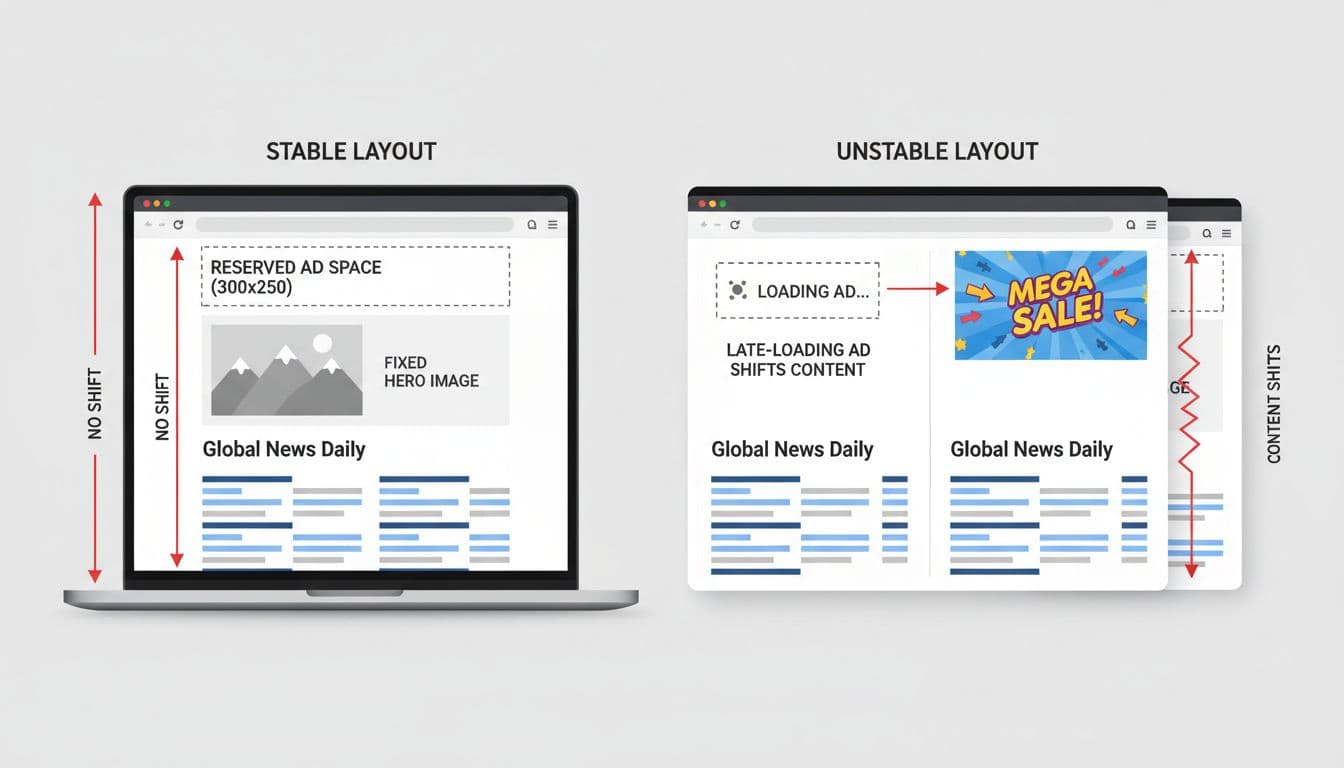
Stable containers prevent “page jump” when ads and embeds load, created with AI.
If you only fix one thing this quarter, fix CLS. It’s also the area where publishers can improve without cutting ad demand, because the goal is predictability, not fewer ads.
Start with ad slots:
- Reserve space using fixed heights where possible, or responsive mapping with a known set of heights. If a slot can be 250px or 600px, don’t start it at 0px.
- Use placeholders that match the final slot size, not a tiny skeleton.
- Avoid injecting new DOM above existing content after first render. If a module must appear (breaking news banner, subscription offer), make room for it from the start.
Then handle embeds:
- Put every embed inside a stable container with a set aspect ratio (video, social cards, maps).
- Don’t let an embed “upgrade” itself from a short preview to a tall widget without reserved space. If you can’t know the final height, cap it and allow internal scrolling.
Watch for common CLS traps that hide in plain sight:
Consent banners that slide content down are a top offender. A safer pattern is an overlay that doesn’t move the document flow. Expanding nav bars and sticky headers can also shift content, especially if they change height on scroll. Lazy-loaded images without width and height (or without CSS aspect ratio) will shift when they decode. Web fonts can cause reflow when the real font replaces the fallback; if the fallback is much wider, lines wrap and the article “breathes” as it loads.
For teams that want a deeper troubleshooting checklist, this advanced Core Web Vitals diagnosis guide covers practical causes and fixes that map well to editorial templates.
Next, make the main story content load fast even if third parties are slow
Once your layout stays put, shift attention to LCP. On most editorial pages, LCP is one of these:
- The hero image (or featured image)
- A large headline block
- A featured video poster
Your job is to make that element arrive early, even if ad tech and embeds are still loading.
Start with the basics that don’t require new infrastructure:
Inline just enough critical CSS for the above-the-fold layout, and defer the rest. Reduce render-blocking scripts in the head, and move non-essential tags to later. If your CMS injects many scripts early “just in case,” split them by template and load them only where needed.
Then protect the hero:
Preload the hero image when it’s known, and make sure the browser can request it early (don’t hide it behind a late JavaScript render). Use responsive images so mobile doesn’t download desktop-sized assets. Also, check priority hints or lazy-loading flags, because a mistakenly lazy-loaded hero is a quiet LCP killer.
The biggest LCP wins on publisher sites often come from one policy change: delay non-critical third parties until the main content is visible. That might mean waiting until after the first render, after a short timeout, or after the user scrolls. The reader came for the story, so the story should win the race.
Finally, don’t forget server and edge caching. Faster HTML delivery won’t solve everything, but it shortens the time to first render and gives the browser a head start on the hero image request. It also helps during breaking news spikes, when origin load can turn “normally fine” pages into slow pages that fail vitals across the board.
Taming third-party scripts without losing revenue or story features
Third-party code is where good intentions go to die. Each vendor promises a small snippet, but on a busy page, those snippets add up: extra requests, long tasks, layout shifts, and surprise CPU spikes on mid-range phones.
The goal isn’t to delete everything. It’s to run third parties with rules:
- Audit what runs on the article template (not just what’s in tag manager, also what vendors inject).
- Decide what can run early, what must wait, and what can be removed on certain devices or connections.
- Set ownership so “just add this embed” doesn’t bypass performance review.
web.dev’s best practices for third-party embeds are especially useful for editorial teams, because they frame embeds as products that need a loading strategy, not as “content.”
Control script timing with loading rules, timeouts, and graceful fallbacks
A practical control system usually includes three parts: loading order, timeouts, and fallbacks.
Loading order: keep early execution for only what the reader needs to start reading. Consent and basic analytics might be required. Everything else should have a reason to be early.
Timeouts: if a vendor is slow, don’t let it block the page forever. Put strict caps on how long you’ll wait before skipping, swapping to a lighter version, or retrying later.
Fallbacks: decide what happens when something doesn’t load. Two patterns help teams make fast decisions:
- Fail open (common for ads): if the ad call is slow, show the reserved slot, continue rendering, and fill later. Don’t freeze the page waiting for an auction.
- Fail closed (common for embeds): if the embed is slow, show a static thumbnail or link preview, and let the reader choose to load the full widget.
Lightweight embed options are underused. A static preview card for a social post often tells the story just fine, and it can link out or load the full embed on tap. For video, a poster image with a click-to-play player can reduce CPU drain and interaction lag, while still serving the editorial purpose.
Make ad layouts predictable with fewer surprises and smarter refresh logic
Revenue teams need formats that perform. Performance teams need pages that don’t jump and don’t lock up. You can get both, but the page needs fewer surprises.
Start above the fold. Keep the number of ad slots near the top small and consistent, and avoid large creative swaps that change container size. If you run high-impact formats, reserve space for the maximum size or restrict those formats to templates where you can control layout.
Then look at refresh and lazy load. Refresh can be great for revenue, but it can also create extra work on the main thread. If refresh triggers heavy DOM changes or video units, it can harm INP on slower devices. Tie refresh to clear conditions (viewability, time-on-page, user idle), and put guardrails around CPU-heavy formats.
This is also where publisher-focused guidance helps. Aditude’s 2026 publisher playbook on CWV and viewability is a good example of how teams can align supply quality, viewability, and performance without pretending monetization is optional.
Measure the right way, then keep Core Web Vitals from slipping again

Photo by Atlantic Ambience
You can’t fix what you can’t see, and Core Web Vitals are easy to misread if you only look at one source.
A solid plan uses two views:
- Lab testing (fast feedback): good for catching regressions, spotting render-blocking resources, and seeing which scripts create long tasks.
- Real user data (truth): confirms whether changes helped on real devices, networks, and referrers.
For publishers, it’s also important to measure by template and vendor. “Our site is slow” is too vague to act on. “Live blog template is failing CLS when Vendor X returns a 970×250 creative” is actionable.
If you want a concrete way to connect experience metrics to business outcomes, web.dev’s article on Core Web Vitals and ad revenue analysis shows how to correlate performance and monetization using Google’s tooling, which can help performance work get prioritized.
A weekly checklist for article templates, live blogs, and special features
Editorial publishing cycles move fast, so the process has to fit the cadence. A lightweight weekly routine prevents the common pattern where a site improves, then slowly slips back as new tags and embeds arrive.
Use this short checklist:
- Test key templates on mobile: at least article, live blog, and whatever template Discover traffic hits most.
- Spot check top referrers: pages can behave differently from Discover, social apps, or AMP-to-canonical flows.
- Watch CLS after ad changes: any new slot, new bidder, or new creative rule deserves a quick regression check.
- Review new embed requests: require a load strategy (lazy load, click-to-load, reserved space) before approval.
- Set a release gate: no new third-party code without a note on size, when it runs, what it can move on the page, and what happens if it fails.
This isn’t about slowing teams down. It’s about making performance the default, so you don’t have to do emergency cleanups after every big package or partner launch.
Conclusion
Editorial sites don’t lose Core Web Vitals because they run ads and embeds. They lose them because pages become unpredictable: shifting layouts, late-loading heroes, and scripts that block taps. Start by stopping layout shifts, then get the main story visible fast, then make interactions feel instant. Audit third-party tags, lock in stable containers, and set clear template rules, and your Core Web Vitals can stay healthy without starving your newsroom of revenue or storytelling tools.